Description
Allen-Bradley 1203-GK5 Full English Technical Document
Product Title
Allen-Bradley 1203-GK5 Industrial Remote I/O Communications Adapter Module
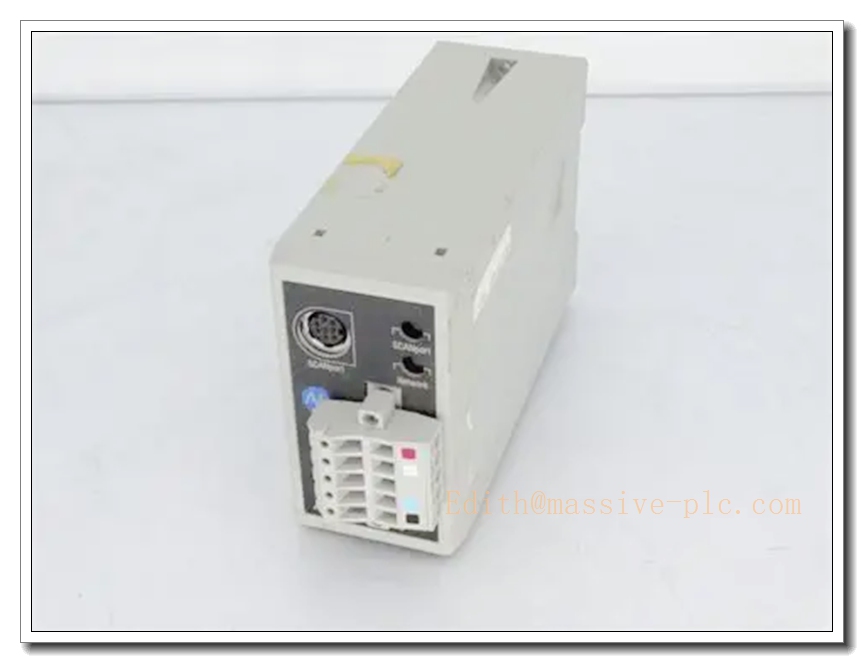
1203-GK5
Product Description
The Allen-Bradley 1203-GK5 is a rugged, industrial-grade remote I/O communications adapter module developed by Rockwell Automation, belonging to the Allen-Bradley Bulletin 1203 product ecosystem. Purpose-built for distributed industrial automation scenarios, it acts as a high-performance protocol conversion and signal transmission hub, seamlessly connecting Allen-Bradley variable frequency drives and field industrial devices to upper-level Logix series controllers via the native Rockwell remote I/O network. It delivers exceptional long-term operational stability and full native interoperability with Rockwell Automation control platforms, making it a trusted drop-in replacement spare part for legacy Allen-Bradley distributed drive control system maintenance and retrofitting projects.
Technical Specifications
- Manufacturer: Allen-Bradley (Rockwell Automation)
- Part Number: 1203-GK5
- Product Type: Remote I/O Communications Adapter Module
- Communication Protocol: Native Rockwell Automation remote I/O protocol, supporting seamless drive network interconnection
- Communication Interface: Dedicated remote I/O network port, supporting high-speed industrial serial communication
- Rated Operating Voltage: 24 V DC (±10%)
- Operating Temperature Range: -20°C to +60°C
- Ambient Humidity Rating: ≤95% non-condensing, suitable for non-corrosive industrial environments
- Enclosure Protection Rating: IP20 for standard industrial control cabinet deployment
- EMC Performance: Industrial-grade strong electromagnetic interference resistance
- Mean Time Between Failures (MTBF): ≥70000 hours
- Warranty Period: 12 months from factory delivery
Key Features and Advantages
- Native seamless compatibility with Allen-Bradley variable frequency drives and Logix series controllers eliminates the need for third-party protocol conversion hardware, enabling direct drop-in replacement for legacy 1203 series remote I/O adapter modules
- Dedicated remote I/O communication architecture delivers ultra-stable high-speed data transmission between drives and upper-level controllers, drastically reducing motor control signal latency and improving motion control accuracy
- Built-in full electrical isolation architecture effectively blocks industrial site surge voltage and electromagnetic interference, preventing communication anomaly and system crash risks caused by field electrical noise
- Rugged industrial-grade construction ensures long-term reliable operation under high-vibration, high-electromagnetic-interference harsh industrial conditions
- Full Rockwell Automation ecosystem integration enables unified drive parameter configuration, real-time status monitoring, and fault diagnosis through the upper-level control system
- Standard modular design simplifies on-site installation and maintenance, supporting fast replacement without full production line shutdown
- Full backward compatibility with legacy Allen-Bradley distributed drive control system spare part ecosystem ensures long-term supply chain support for aging system maintenance
- Strict compliance with Rockwell Automation official industrial control safety guidelines meets global industrial equipment regulatory requirements, supporting safe deployment in worldwide industrial facilities
Model Parameter Details
| Part Number | Core Configuration |
|---|---|
| 1203-GK5 | Standard remote I/O communications adapter module, 24V DC power supply, native Rockwell remote I/O protocol support, dedicated drive network interconnection, full Allen-Bradley drive system compatibility |
Application Fields
- Large-scale manufacturing production line distributed variable frequency drive control system
- Petrochemical plant industrial automation system motor speed regulation and remote supervision
- Heavy industrial metallurgy production line high-power motor group centralized control
- Intelligent logistics automated conveyor system multi-drive coordinated motion control
- Legacy Allen-Bradley Bulletin 1203 series control system spare part replacement and retrofitting scenarios
- Power plant industrial automation system auxiliary equipment drive remote monitoring
Related Product Recommendations
- Allen-Bradley ControlLogix Series Main Processing Unit
- Allen-Bradley 1203-GK5 Dedicated DIN Rail Mounting Bracket Kit
- Allen-Bradley Redundant 24V DC Power Supply Unit for Control Cabinets
- Allen-Bradley Dedicated Shielded Remote I/O Industrial Communication Cable Kit
- Rockwell Automation Studio 5000 Official Configuration and Diagnostics Software
- Allen-Bradley Industrial Signal Surge Protection Barrier Module
- Allen-Bradley PowerFlex Series Variable Frequency Drive Set
- Allen-Bradley 1203-GK5 Field Calibration and Debugging Toolkit
Pre-Installation Safety Precaution
Before initiating any hardware installation or wiring procedures, ensure all connected industrial control systems and high-power variable frequency drive circuits are fully de-energized, locked out, and tagged in strict compliance with local industrial electrical safety regulations. Only qualified industrial automation and electrical maintenance personnel with professional high-voltage operation certification are authorized to perform installation work. Never insert or remove the module while the system is connected to live high-power circuits, as improper hot-plug operations may cause permanent hardware damage or unexpected motor movement safety risks. All installation and maintenance operations must strictly follow Rockwell Automation official Bulletin 1203 series product safety guidelines.
Hardware Installation Steps
- Select a dedicated mounting position on the DIN rail inside the industrial control cabinet, ensuring sufficient ventilation clearance around the module, avoiding direct exposure to high-temperature radiation, moisture, or corrosive industrial dust
- Secure the module firmly to the DIN rail, confirming the mechanical locking mechanism engages completely to prevent vibration-induced disconnection during long-term operation
- Connect the 24V DC power wiring to the module’s dedicated power terminals, verifying the power supply voltage matches the module’s rated specification before applying power
- Terminate all variable frequency drive signal and remote I/O network wiring strictly following the official Allen-Bradley wiring schematic, confirming signal polarity, shielding single-point grounding, and terminal labeling accuracy
- Wire all upper-level PLC system communication cabling with proper shielding grounding, to eliminate strong electromagnetic interference impact on remote I/O signal transmission stability
- Torque all wiring terminals to the specified torque values, and install dedicated cable strain relief for all external field wiring runs
System Configuration Workflow
- Power on the module after completing all wiring checks, confirm the power indicator LED on the front panel illuminates in normal steady state with no active fault alarms
- Connect the configuration engineering workstation to the Rockwell automation system service port, launch the official Studio 5000 configuration software to establish stable communication with the new module
- Complete basic device parameter setup, including module identification, local time synchronization, and remote I/O station address allocation configuration
- Calibrate all drive communication mapping parameters, matching the connected variable frequency drive operational addresses to ensure seamless data exchange between the adapter and drives
- Configure remote I/O communication protocol parameters, enabling seamless real-time data exchange between the new module and the upper-level Logix series main control unit
- Customize communication fault alarm thresholds and drive emergency stop interlock logic according to specific on-site production process requirements, then save the full configuration profile to non-volatile onboard memory
Post-Installation Verification Checklist
- Confirm all front-panel status LEDs operate in normal state, with no persistent active fault or warning indicators
- Validate that real-time variable frequency drive status data fully matches the expected on-site operational parameter readings
- Perform full remote I/O communication testing, confirming the module transmits accurate, stable data between drives and the upper-level control system without data loss or bit error anomalies
- Test the built-in self-diagnostic function manually, confirming the module correctly identifies communication disconnection and hardware anomaly conditions and triggers corresponding fault alarms
- Verify end-to-end communication connectivity between the module and the Allen-Bradley main control unit, confirming complete, uncorrupted real-time data transmission
- Trigger the full system power cycle test, confirming the module resumes normal operation automatically after power restoration without configuration loss or communication fault events